The Momo Challenge: What schools need to know
July 20, 2019

By now you’ve probably heard a lot about the Momo Challenge, a deadly online game that’s been scaring the daylights out of students - and parents - around the world. The object? To drive players to self-harm or suicide with the threat of making their private information public.
At the centre of this sick digital blackmail plot is the character Momo - a creepy bird-woman with bulging eyes, stringy black hair, and a boomerang-shaped mouth.
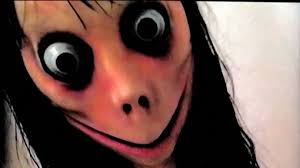
Momo is purported to hack into users’ mobiles, once they engage with her by sharing their phone number, then send disturbing and graphic photos. Users are then challenged to perform ‘dares’, including acts of self-harm, or face the consequences of having their secrets and private information shared online.
When it first surfaced in 2018, the Momo challenge was linked to a number of teen suicides around the world. But digging deeper into the scandal - as many reputable news organisations have now done - none of these incidents has been substantiated.
Is there a ‘real’ Momo involved? Was there ever? Experts say: very likely not.
Nevertheless, in recent days, reports of Momo images and animations cropping up on YouTube and YouTube Kids have rekindled the panic.
This time around, say experts, the Momo invasion simply the result of kids scaring other kids (and themselves) by copying and sharing creepy images and videos - and parental anxiety and social-media-sharing fanning flames - and all of it in response to widespread, unverified reporting by the media.
The take-home message? Momo is well and truly ‘fake news’ - a digital bogeyman of global proportions.
But that doesn’t mean that the fear isn’t real. Or that Momo hasn’t been a useful disguise for a handful of cyberbullies of all ages.
We spoke to cyber expert and child psychologist Jordan Foster from ySafe to ask about this phenomenon and find out what information schools should be sharing with their students and parent communities.
Q : What are your thoughts about the Momo challenge?
A: The Momo Challenge presents two key learning opportunities for us as members of a digital community. The first is that fact-checking is essential before investing our worry and concern into something we’ve read. Much of what is posted online is done so by unreliable sources who are seeking attention or notoriety. People’s trust can be easily exploited when information shared implies a threat to our children’s safety.
Secondly, the relief about the ‘fake news’ nature of Momo should not deter parents from being vigilant about what their child is looking at online. There is an abundance of inappropriate and harmful content posted on platforms like YouTube and YouTube for Kids. Pornographic content and violent videos continue to seep into these video platforms that are beloved by our kids. This dark Momo challenge therefore serves as a timely reminder that we need to be active in our child’s digital lives, and safeguarding them every time they enter into the online world.
Q : What advice would you give to parents?
A: Fact check, always. What’s more, make sure you fact check to credible sources of information. Blog posts, social media comments and YouTube videos uploaded by unverified authors are not valid sources of information.
Use parental control tools to block access to inappropriate or unsafe websites and apps. One of the most important features of a parental control tool is the report that parents receive about what has been blocked, and WHY. Make sure you regularly read the reports about why an app or website has been blocked. This helps improve your knowledge and keeps you up-to-date on current cyber safety threats.
Talk to your kids about how information is posted on the internet. Teach them the difference between credible news websites and people sharing opinions or experiences. During the talk, discuss with them what they can do if they ever feel scared or worried about something they have seen online. Kids feel empowered and less distressed by online content when they are equipped with information about how to protect themselves.
Q : What advice would you give to students?
A: There are some great people on the internet posting some amazing stuff, but sometimes there are nasty people who post things that try and scare and upset us. We’re all lucky in that we are in control of what we look at and what we don’t. So if you ever see something that seems strange, upsets you or asks you to do something you think is worrisome, turn it off and talk to a trusted adult about it.
Hoax or not, many parents have asked us the best way to keep their kids safe from this type of content, so below you'll find questions and answers from some of the most common queries we've received from Family Zone customers
What can School Manager do to help keep students safe?
Due to the way that Momo images may be spread between students, we can’t guarantee they won’t find a way to share it with their friends. However, we can offer some solutions, thanks to School Manager’s child safety features, that will help to minimise the risk.
We can offer solutions involving YouTube restricted mode enforcement, and Layer 7 application filtering to help block network access to potentially dangerous applications.
We also recommend ensuring that your school’s parents make use of our Mobile Zone application, to help parents to observe and control their child’s internet behaviour outside of school hours. This helps parents to feel safer, and helps you to know that the content won’t be brought in to the school from the child’s home internet access. Contact your accounts manager for more information on how to become a Mobile Zone-enabled school and easily provide this solution for your solutions.
See below for some insight in to how to help minimise the risk of students being exposed to Momo-related content.
How do I block Momo videos on YouTube?
Videos that contain Momo are not listed as Momo videos; instead, people put Momo into other innocent-looking videos. YouTube has been marking videos including Momo content as being "identified by the YouTube community as inappropriate or offensive to some audiences" and that "viewer discretion is advised." If you have Restricted mode on for your student accounts, this content is not available to them; however this will block all uncategorised content also. To do this;
-
Log into your School Manager cloud console
-
Click on ‘Filtering’ on the dark grey bar
-
Click on the ‘Safe Search’ section in the second menu
-
Click ‘Add rule’ to add a new Safe Search policy
-
Select which networks or groups that you’d like to enforce Safe Search for, then tick ‘YouTube Strict’
-
Click ‘Save’
-
Perform a test to ensure that YouTube enforcement is working correctly for your chosen groups/networks. If you have any issues, please call our education support team for further assistance.
What other applications can I block, to prevent the student from receiving Momo-related content?
There have been reported incidents of students receiving Momo-related videos & content on WhatsApp, as well as multiple online games which provide a chat facility. The safest way to comply with your duty of care and prevent students from accessing these applications is to block WhatsApp & Gaming applications directly.
To do this;
-
Log in to your School Manager cloud console
-
Click on ‘Filtering’ on the dark grey bar
-
Click on the ‘Content Filtering’ section
-
Click ‘Add Rule’ to add new filtering policy
-
In the ‘Type’ field, enter ‘Momo’ then click on the ‘Momo Internet and Telecom: Social Media’ row
-
Repeat the above step to add the following items to the type field:
-
‘WhatsApp Internet and Telecom: Voip and Messaging’
-
‘Gaming All gaming’
-
Choose the groups/networks that you’d like to apply this restriction to under the ‘Criteria’ field, then click ‘Save’ to save the new rule
Is there a way to block searches by a keyword? For instance, if a student searches for "Momo" the search is automatically blocked.
While we can’t currently block searches based on a single term, we can identify which students have searched for this term. This can help your pastoral care or counselling team to discuss the topic with the student, and help them to understand what it is and why they don’t have to follow through with the challenges set out. It also provides an opportunity to discuss the student’s mental health with them, and provide any support that the school might see as necessary.
What can I do to stop students from showing Momo content at school?
After the content has been downloaded to the student’s device, it can be shown to other students and shared with other students freely (via any platforms that are not blocked by your school policies). To prevent this from happening, we recommend becoming a Family Zone partner school so you can provide our Mobile Zone solution to your parents, to help prevent the students from getting access to this content at home, so that it can’t be brought in to your school.
Topics: Cyber Safety, Cyber Experts, self-harm, hoax, suicide, momo